
How Free VPNs Sell Your Data: Risk Report & Checklist 2026
Last updated: 13 September 2026 | Asset type: Free VPN risk report, checklist, and shareable graphic | Method: privacy-policy review, ownership checks, app-store signal checks, permission review, and public security guidance.
Disclosure: VPN Rocks is reader-supported and may earn a commission from some paid VPN links. The risk checklist below is designed to be useful even if you never buy through VPN Rocks.
Free VPNs are not automatically malicious, but they deserve more scrutiny than a paid security tool. VPN servers, bandwidth, apps, audits, and support all cost money. If a VPN is free, the first question should be simple: who is paying for it, and what do they get in return?
This report turns that question into a practical checklist. It does not claim that every free VPN is unsafe. Instead, it highlights the risk indicators ordinary users can check before trusting a free VPN with browsing data, app traffic, public Wi-Fi sessions, or streaming accounts.
Choose your next step
Assess an app, save the checklist, or compare paid alternatives
You do not need to read the full report before acting. Pick the route that matches where you are in the decision.
Direct answer
How do free VPNs sell your data?
Some free VPNs monetise users by collecting device identifiers, app events, approximate location, connection metadata, or browsing-related signals and sharing or using them for advertising, analytics, profiling, or partner offers. It is not always a literal sale of named browsing histories: the data can move through ad SDKs, analytics systems, vaguely described business partners, or aggregated-data products.
- 1. Collection: the app records identifiers, connection events, diagnostics, location signals, or activity data.
- 2. Labelling: the policy describes it as analytics, service improvement, non-personal data, or advertising data.
- 3. Sharing: ad networks, analytics providers, affiliates, or other partners receive or process the information.
- 4. Monetisation: the data supports targeted ads, cross-app profiles, market analysis, retargeting, or paid upgrades.
A reputable free tier should clearly explain what is collected, rule out browsing-history sales, name relevant third parties, and provide a credible funding model.
Quick answer
The strongest lower-risk free VPN route is usually a limited freemium product from a reputable provider
- Best free route: a reputable freemium VPN with clear limits, transparent ownership, and no advertising-based privacy trade-off.
- Biggest red flag: an unknown app promising unlimited free VPN access without explaining the business model.
- Best paid upgrade path: compare NordVPN, Surfshark, and ExpressVPN if you need regular streaming, travel, or all-device protection.
What this report gives readers
A fast risk scorecard
Seven checks for logging, funding model, ownership, audits, app permissions, ads/tracking, and leak protection.
Policy wording to look for
Plain-English examples of the data types and vague phrases that make a free VPN worth questioning.
Shareable safety angle
A concise summary journalists, newsletters, and community moderators can cite when discussing free VPN safety.
For journalists, bloggers, and resource pages
Copy/paste citation snippets for free VPN safety coverage
If you are writing about free VPN risks, public Wi-Fi safety, app-store privacy, or consumer security checklists, you can cite this report as a practical framework rather than a claim that every free VPN is unsafe. Please link to this page as: VPN Rocks Free VPN Risk Report 2026.
Short citation
VPN Rocks' 2026 Free VPN Risk Report recommends checking logging policy wording, ownership transparency, funding model, permissions, trackers, audits, and leak protection before installing a free VPN.
Consumer-safety angle
The report warns that an unknown unlimited free VPN with no clear funding model can be a bigger privacy risk than using no VPN, because the user is routing traffic through a company they cannot evaluate.
Practical checklist angle
For ordinary users, the strongest lower-risk free route is usually a limited freemium VPN from a transparent provider rather than a no-name app promising unlimited free bandwidth.
UK youth-safety context
UK government-commissioned research published in 2026 found that 22% of children aged 11 to 17 reported using a VPN in the previous three months; among child VPN users, 36% said their VPN was free and 81% said using one made them feel safer online.
Resource-page and outreach angles
Where this Free VPN Risk Report is useful to cite
This page is built as a practical reference for people who need a non-alarmist free VPN safety explainer. If you are maintaining a student cyber-safety page, privacy newsletter, app-store safety guide, or public Wi-Fi resource list, these are the clearest citation angles.
Consumer-safety journalists
Use the seven-point checklist as a plain-English way to explain why 'free VPN' is not the same as 'private VPN'.
Best section to cite: Key findings + methodology snapshot
University and library resource pages
Pair the report with public Wi-Fi and app-privacy guidance for students, travellers, and remote workers choosing security tools.
Best section to cite: Safer free VPN checklist
Privacy newsletters and security educators
Quote the data-selling map to show how app permissions, analytics SDKs, vague partner language, and ad identifiers can become a monetisation chain.
Best section to cite: Data-selling map
Community moderators answering VPN questions
Share the checklist when someone asks whether an unknown unlimited free VPN is safe enough for banking, streaming, or travel Wi-Fi.
Best section to cite: Free VPN Risk Checker companion tool
Methodology snapshot
Five checks behind the Free VPN Risk Report
This page is structured around signals a normal user, journalist, or resource-page editor can verify without specialist lab equipment. The goal is not to rank every free VPN app; it is to make provider trust easier to evaluate before installation.
Privacy-policy wording
Whether browsing, DNS, app-usage, advertising, device-ID, and diagnostic data are ruled out or explained clearly.
Ownership and jurisdiction
Whether the provider names the company behind the app, where it operates, and how users can contact support.
Funding model
Whether the free tier is funded by paid subscribers, ads, partner sharing, bundled upsells, or another stated route.
App permissions and trackers
Whether mobile permissions, analytics, ad SDKs, and background access are proportionate to a VPN app.
Security evidence
Whether no-logs claims, leak protection, audits, open-source code, or technical support docs are current and easy to inspect.
Key findings
- Free VPNs vary widely: some are limited freemium products, while others rely on ads, tracking, data sharing, or unclear monetisation.
- Privacy-policy wording matters more than marketing claims such as “military-grade encryption” or “anonymous browsing”.
- App permissions, ownership details, audit history, and update frequency are useful early warning signals.
- Streaming and heavy travel use are usually poor fits for free VPNs because free tiers commonly have fewer locations, lower capacity, or tighter limits.
- A bad VPN can be worse than no VPN because you are deliberately routing traffic through a company you do not trust.
- For most non-technical users, the strongest lower-risk free choice is usually a reputable freemium VPN with honest limits rather than a no-name unlimited app.
New UK evidence: children and free VPN use
22% of UK children surveyed had used a VPN in the previous three months
A 2026 study commissioned by the UK Department for Science, Innovation and Technology surveyed 2,299 young people aged 11 to 17. It found that 22% reported using a VPN in the previous three months. Among children who used a VPN, 36% said their VPN was free, while 81% said using a VPN made them feel safer online.
22%
used a VPN in the previous three months
36%
of child VPN users said their VPN was free
81%
of child VPN users said a VPN made them feel safer
How to interpret this: the survey shows why practical VPN-safety education matters; it does not show that free VPNs caused online harm or assess the security of any app. The research used a nationally representative sample plus a VPN-user boost, weighted to national VPN-use incidence, and relied on self-reported behaviour collected from 18 to 29 May 2026. Read the full DSIT-commissioned study and methodology.
How free VPNs sell your data
Free VPNs can sell or monetise your data by collecting advertising identifiers, device information, approximate location, connection timestamps, bandwidth usage, diagnostic events, and sometimes browsing or app-usage signals. The risky part is not always a direct sale of your name and browsing history; it is often the packaging of behavioural data for ads, analytics partners, data brokers, or “business partners” described broadly in the privacy policy.
A safer free VPN explains exactly what it collects, why it needs the data, how long it keeps it, and whether any third party receives it. A risky free VPN uses vague language such as “improve services”, “personalised offers”, “partners”, or “non-personal information” without clearly ruling out tracking, advertising SDKs, or cross-app profiling. Use the Free VPN Risk Checker to score a specific app against these warning signs, or start with the shorter Are free VPNs safe? checklist.
Data-selling map
How free VPN data can move from app install to monetisation
The phrase “free VPNs sell your data” is often shorthand. The real risk is usually a chain: collect app or device signals, label them as analytics or non-personal data, share them with ad/analytics/partner systems, then use them for targeting, profiling, or product upsells. Check each step before trusting a free VPN.
Ads and ad identifiers
Data involved: Device IDs, advertising IDs, app events, approximate location, and interaction data.
Risk: The VPN can become another tracking layer if ad partners can connect your VPN app activity to wider profiles.
Analytics and product data
Data involved: Connection events, server choice, crash reports, bandwidth use, device type, and feature usage.
Risk: Diagnostics can be reasonable, but broad behavioural analytics should be explained and limited.
Partner or broker sharing
Data involved: Aggregated, de-identified, or 'non-personal' data described in vague privacy-policy language.
Risk: Aggregation is not a magic privacy guarantee if raw identifiers are collected first or partners are unnamed.
Upsell and retargeting funnels
Data involved: Free-tier behaviour, device count, country/server demand, and account events.
Risk: Using product data to improve a service is different from using it to retarget users across apps or partners.
- Advertising: showing ads inside the app and sharing identifiers with ad networks.
- Analytics: collecting usage events, device details, crash reports, and connection patterns.
- Partner sharing: sending aggregated or “non-personal” data to marketing or research partners.
- Upsell funnels: using free-tier behaviour to push paid plans or bundled security products.
- Opaque infrastructure: routing traffic through companies or servers the app does not clearly disclose.
Examples of free VPN data to check in the policy
Before installing a free VPN, scan the privacy policy for these specific data types and ask whether the explanation is necessary, limited, and easy to understand. Stronger policies explain what is collected, what is not collected, why the data is needed, how long it is kept, and who receives it.
If a free VPN says it collects “non-personal” or “aggregated” data, do not stop reading there. Check whether the policy explains what raw data is collected first, how it is anonymised, who receives it, and whether identifiers can be combined with other app or advertising data.
Free VPN risk scorecard
Use this scorecard before installing a free VPN. One red flag is not always a deal-breaker, but several red flags together are a strong reason to walk away.
Printable one-page resource
Take the seven-check scorecard with you
Open the print-friendly checklist to use while reviewing an app store listing, privacy policy, or provider website. It includes the seven checks, four reasons to pause, and the report's methodology limitation.
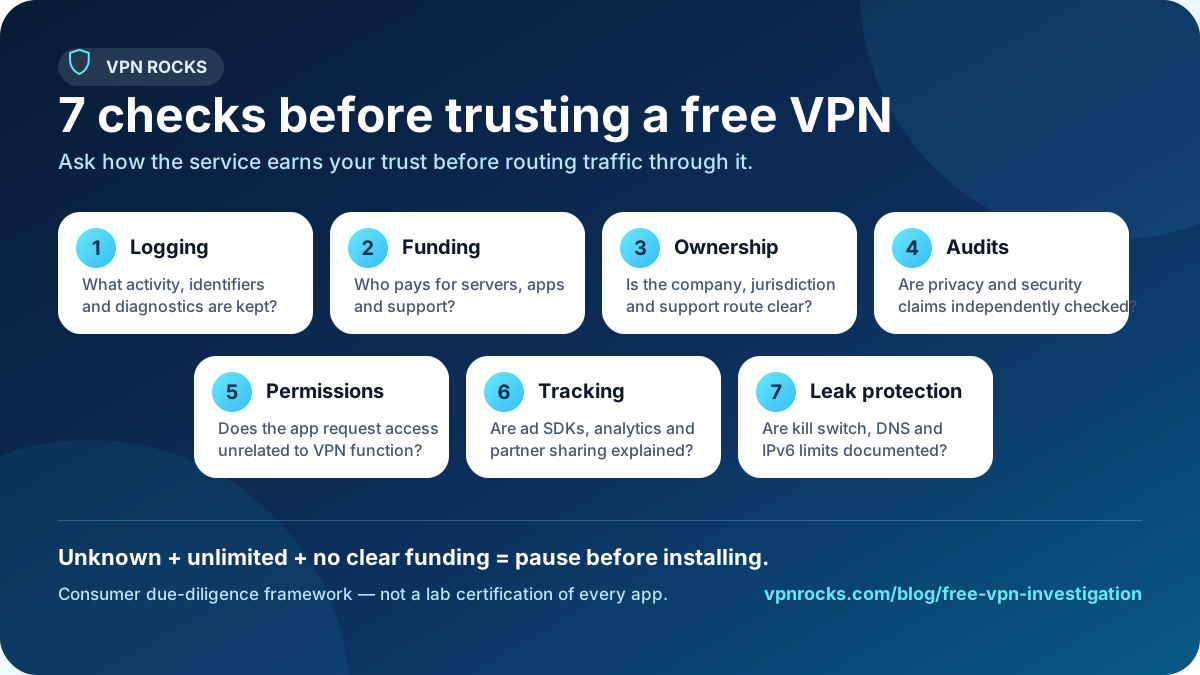
The seven checks to run before trusting a free VPN
- Read the privacy policy before installing, not after you have created an account.
- Check who owns the app and whether the company name matches the app-store listing.
- Look for an independent audit or transparent security documentation.
- Treat unlimited free VPN claims as a reason to ask how the service is funded.
- Review app permissions and uninstall anything asking for unrelated access.
- Prefer reputable freemium products with limits over unknown unlimited free VPNs.
- Use no VPN rather than a VPN you believe may be logging, injecting ads, or routing other users through your connection.
Interactive check
Score a free VPN before you install it
If you already have a specific app in mind, use the VPN Rocks free VPN risk checker to turn these red flags into a quick risk score. It asks about ownership, logging language, permissions, ads, audits, leak protection, and support signals, then points you back to safer alternatives when the risk level is high.
Open the free VPN risk checkerHow free VPNs are commonly funded
There are legitimate and risky ways to fund a free VPN. The clearest lower-risk model is usually freemium: paid subscribers fund a limited free tier. Riskier models include aggressive advertising, broad analytics collection, unclear “partner” sharing, or peer-to-peer bandwidth models where user devices may become part of the network.
The problem is not simply that a VPN is free. The problem is when the service asks for trust but refuses to explain how it pays for infrastructure, who owns the app, what gets logged, and what third parties receive data.
When a free VPN may be acceptable
A free VPN can be reasonable for light, low-risk use if it comes from a reputable provider, has transparent limits, avoids ads, explains its logging clearly, and has credible privacy documentation. For example, a limited freemium tier can make sense for occasional public Wi-Fi browsing where you understand the speed, country, and data limits.
It is usually a poor fit for streaming, torrenting, daily travel, high-risk activism, or work that depends on consistent security. Those use cases need stronger reliability, more locations, better support, and clearer accountability.
Shareable summary
“Do not ask whether a VPN is free. Ask how it is funded, what it logs, who owns it, what permissions it wants, and whether its privacy claims have been independently checked.”
This is the one-line angle to share with readers, journalists, newsletters, and community threads discussing free VPN safety.
Shareable visual resource
Seven checks before trusting a free VPN
This 1200×675 graphic condenses the report into seven provider checks for consumer-safety articles, student resources, newsletters, and helpful community answers. It includes the report URL and states that the checklist is a due-diligence framework rather than a lab certification.

For journalists and resource pages
Useful citation angle: free VPN risk is a trust checklist, not a blanket ban
The most useful takeaway is not “never use a free VPN”. It is that users should verify funding model, ownership, logging language, permissions, audit evidence, and leak-protection claims before routing traffic through any free VPN provider.
- Good fit for consumer privacy, public Wi-Fi, travel safety, app-store risk, and online-safety resources.
- Designed as a reader checklist rather than a vendor ranking or alarmist claim.
- Includes a practical companion tool: the Free VPN Risk Checker.
How to cite this report
Suggested citation: VPN Rocks, “How Free VPNs Sell Your Data: Risk Report & Checklist 2026,” updated 13 September 2026. Use it as a consumer checklist for evaluating free VPN privacy-policy wording, ownership transparency, funding model, app permissions, audit evidence, and leak-protection claims.
Recommended safer alternatives
If you truly need a free VPN, start with reputable freemium services and accept the limits. If you need a VPN every day for streaming, travel, remote work, or protecting multiple devices, a paid provider is usually the more honest choice.
Best free route
Reputable freemium VPN
Best for light use when the provider is transparent and the free tier has honest limits.
Best all-round paid upgrade
NordVPN
A stronger option for everyday privacy, travel, and streaming. Read review.
Best value paid alternative
Surfshark
Worth comparing if household value and multiple devices matter. Read review.
Next steps
Commercial disclosure: paid VPN links may earn VPN Rocks a commission. The checklist above should still help you reject risky products without buying anything.
See NordVPN offerMethodology and limitations
VPN Rocks reviewed the risk factors a normal user can verify before installation: privacy-policy language, ownership transparency, public audit claims, app-store signals, stated business model, support documentation, and permission patterns. This report is a risk framework, not a lab certification of every free VPN app.
VPN apps change quickly. Treat this page as a decision checklist and re-check the provider’s current policy, app permissions, and audit status before trusting any VPN with sensitive activity.
Evidence boundary
What the sources can—and cannot—prove
The sources below support the report's risk categories and audience context: provider trust, app-data disclosure, tracking, current UK youth VPN use, DNS and WebRTC behaviour, and VPN leak edge cases. The UK survey describes self-reported behaviour rather than app safety or causation. The academic Android VPN study is useful historical evidence, but it does not describe every app available in 2026. VPN Rocks has not run a new representative app-store census, packet-capture study, or malware scan for this page, so the report does not publish a percentage of current free VPNs as unsafe.
Sources and further reading
Each source has a defined role. The UK government-commissioned survey provides current audience context, platform and regulator guidance supports due-diligence checks, technical documentation explains leak surfaces, and the peer-reviewed paper is labelled as historical evidence rather than presented as a current market measurement.
Current UK government-commissioned research (2026)
UK Department for Science, Innovation and Technology: Children’s circumvention behaviours onlineReports nationally representative, weighted survey evidence on VPN awareness and use among UK children aged 11 to 17, including how many users said their VPN was free and how safe VPN use made them feel.
Current consumer guidance
EFF Surveillance Self-Defense: Choosing the VPN that's right for youExplains the trust questions users should ask about a VPN provider, including business model, data collection, reputation, and technical fit.
Peer-reviewed historical evidence (2016)
ACM Internet Measurement Conference: An Analysis of the Privacy and Security Risks of Android VPN Permission-enabled AppsProvides academic evidence that Android VPN apps can create privacy and security risks; it is historical context, not a census of today's app stores.
Current platform policy
Google Play User Data policySets disclosure, consent, data-handling, and secure-transmission expectations for Android apps distributed through Google Play.
Current regulator guidance
UK ICO guidance on online tracking and privacyProvides plain-English context for cookies, tracking technologies, user choice, and the limits of vague privacy language.
Technical explainer
Cloudflare learning centre: what DNS is and why leaks matterExplains DNS, which helps readers understand why DNS handling and leak protection belong in a VPN risk checklist.
Technical documentation
Mozilla documentation on WebRTC, a common VPN leak topicDocuments the browser technology behind one class of IP-address exposure that VPN users may need to test.
Current technical issue record
GrapheneOS issue tracker discussion of Android VPN leak edge casesShows why kill-switch and leak claims need caveats: operating-system behaviour and edge cases can change over time.
FAQ: free VPN safety
Is a free VPN better than no VPN?
Not always. A trustworthy free VPN can help on public Wi-Fi, but an untrusted VPN can collect data, inject ads, leak traffic, or create a false sense of security. If you do not trust the VPN provider, do not route your traffic through it.
What is the strongest lower-risk type of free VPN?
Usually a limited freemium tier from a reputable paid provider. Limits are not automatically bad; they can be a sign that the free tier is funded by paid plans rather than by data monetisation.
Can a VPN make me anonymous?
No. A VPN can hide your IP address from some sites and protect traffic on local networks, but it does not stop account tracking, browser fingerprinting, malware, phishing, or data collection by websites you log into.
Why do free VPNs often struggle with streaming?
Streaming requires capacity, location options, and quick recovery when servers are blocked. Free tiers often have fewer servers, more congestion, or limits that make regular streaming frustrating.
Where to go next
If this article helped, compare the wider shortlist or jump into the most-read hands-on review.